
Basilica Cistern Photography Rules & Tips
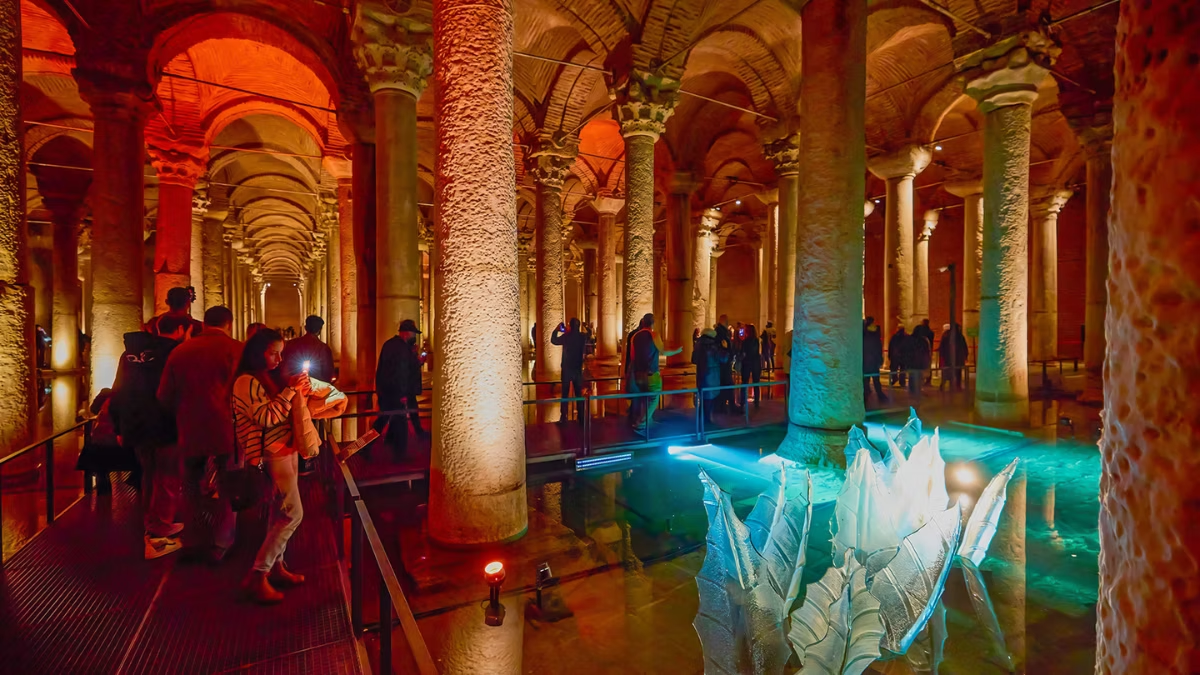
Photography is permitted inside the Basilica Cistern for personal use. Phone and handheld camera shooting is allowed and encouraged. However, flash units, tripods, monopods, selfie sticks, and professional lighting equipment are prohibited. The best photo spots are the twin Medusa Heads in the northwest corner, the Crying Column in the central hall, and the long column rows near the entrance (where reflections on the shallow water work best). The low-light conditions favour fast lenses, high ISO, and phone night modes.
The Basilica Cistern is one of Istanbul’s most photogenic interiors — 336 marble columns rising out of still water, lit by the dramatic red-and-amber scheme installed during the 2022 restoration, with the eerie upside-down Medusa heads tucked into a far corner. It’s also technically one of the harder places in the city to shoot well. Low light, narrow walkways, a constant stream of other visitors, and a ban on stabilising equipment all push against getting a clean frame.
This guide covers the current 2026 photography rules, the specific spots that reward the effort, and the settings and workarounds that actually produce good images in a space where tripods aren’t an option. It’s useful whether you’re shooting on a phone, a mirrorless camera, or a full DSLR.
What You Can and Can’t Shoot Inside
Handheld photography and video are permitted with phones, compact cameras, mirrorless cameras, and DSLRs for personal use. Flash photography is prohibited throughout the site. Tripods, monopods, selfie sticks, external lighting units, drones, and any professional rig requiring setup are not allowed. Commercial photography and video shoots require a separate permit from Kültür AŞ.
What’s allowed
- Phone photography — the most common form used inside, and perfectly adequate for most visitors
- Handheld DSLR and mirrorless cameras — including professional bodies, as long as they’re handheld
- Compact cameras, action cams, and handheld gimbals — gimbals are a grey area; small handheld stabilisers are generally tolerated, larger production gimbals get flagged
- Video recording — handheld only, for personal use
What’s banned
- Flash photography — the single hardest rule. Staff will intervene quickly; flash damages other visitors’ experience and interferes with the carefully designed ambient lighting.
- Tripods and monopods — for safety and walkway flow. Even a compact travel tripod will be flagged at security.
- Selfie sticks — banned since 2022 for safety around the narrow mesh walkways.
- External flash units, continuous lights, LED panels — any lighting accessory is off-limits.
- Drones — prohibited across Sultanahmet’s protected archaeological zone. Using one will involve the police.
- Commercial shoots without permission — if you’re shooting for a publication, brand, or paid commission, you need a permit from Kültür AŞ. Sultanahmet enforcement is active.
The grey areas
- Small tabletop tripods and gorillapods: Technically banned under the “no stabilisation equipment” rule. Some visitors report getting through security with compact versions in a backpack; others have them confiscated at the door. Not worth the risk.
- Portable LED phone lights: Banned if they look like accessories. A phone torch used briefly to illuminate a column detail is tolerated.
- Commercial-looking camera rigs: A big DSLR with a long lens on a strap is fine. The same DSLR on a gimbal with a shoulder rig and an external monitor draws attention.
The Best Photo Spots
There are four main places inside that deliver the strongest images, plus a handful of smaller details worth the effort.
1. The Medusa Heads (northwest corner)
The signature shot. Two carved Medusa heads, one lying on its side and one upside down, repurposed as column bases in the far corner of the cistern. The lighting here is warm amber, deliberately moodier than the rest of the site. Queues form around the barrier in high season — wait for a gap between groups, compose tightly, and you have 20–30 seconds of clear foreground before the next person steps up.
Shooting tips:
- Get low to emphasise the scale of the column rising above the head
- Shoot wide (24–35mm equivalent) to include both the head and some of the column
- The barrier is close — a phone usually composes better than a long lens
- Expect to repeat the visit if you want both heads cleanly framed
2. The long column rows (near the entrance)
Walking in, the first wide view of the cistern runs straight down parallel rows of columns disappearing into the distance. This is the photograph that sells the scale of the space. Shoot it just after you descend, before other visitors crowd the walkway.
Shooting tips:
- Wide angle works best (14–24mm on full frame, 10–18mm on APS-C, 0.5x on phones)
- Include reflection on the water surface — the still water creates near-mirror reflections when the walkway is quiet
- Shoot at an angle rather than straight down the middle if you want more visual depth
- Early morning (09:00–10:30) or late afternoon (16:30–18:30) gives the cleanest foreground
3. The Crying Column (central hall)
A single column carved with teardrop patterns, supposedly commemorating the slaves who died building the cistern. It’s positioned mid-site and slightly set back from the main walkway. The stone is constantly wet — water actually weeps down the surface, reinforcing the myth.
Shooting tips:
- Shoot close, with shallow depth of field if you have the glass for it (f/2.8 or wider)
- Side lighting works best — the teardrops pop when light rakes across them
- Don’t shoot straight at the water — you’ll get reflections of your own phone
4. The reflection shots (throughout)
The shallow water on the floor acts as a mirror. In quiet moments, you can get near-perfect symmetrical compositions of columns and their reflections. This is the shot that photographers come for.
Shooting tips:
- Lower your camera towards the water surface — the lower the angle, the more dramatic the reflection
- Wait for the water to still completely; footfalls from other visitors create ripples
- This is where a phone’s night mode genuinely outperforms cheap compact cameras
Bonus details
- The brick vaulted ceiling directly above the entrance stairs — good for a graphic overhead shot
- Individual column capitals — the cistern reused Corinthian and Ionic capitals from older Roman buildings, and the variety is genuinely interesting up close
- The contemporary art installations — semi-permanent sculptural pieces added after the 2022 renovation; they rotate occasionally. Less iconic but photographically fresh.
Settings for the Low-Light Interior
The cistern runs at roughly 20–50 lux in the main walkway areas — about the same as a restaurant at dinner. Even the brighter feature lighting on the Medusa Heads is dim by camera standards. Without a tripod, you need to compensate with camera settings.
On a phone
Modern phones handle the cistern surprisingly well. Specifically:
- Use Night Mode. On iPhone (11 and newer), Samsung Galaxy S-series, and Google Pixel, the computational night modes use 2–5 seconds of handheld capture stacked together. Results are genuinely good.
- Keep the phone steady against a column or handrail. Brace it rather than holding in mid-air — even 2 seconds of stability makes a difference.
- Shoot RAW if your phone supports it. More latitude for post-processing the shadows.
- Don’t zoom with the digital zoom. Use the 1x lens and crop later; or use the ultra-wide 0.5x for the wide establishing shots.
On a mirrorless or DSLR
Without a tripod, you’re working with the exposure triangle. A practical handheld starting point:
- Aperture: Wide open — f/2.8 or faster if you have it. f/1.8–f/2.0 lenses make a noticeable difference.
- Shutter speed: 1/30s to 1/60s is the realistic handheld limit. With a stabilised lens, you can push to 1/15s.
- ISO: 3200–6400 on full-frame, 1600–3200 on APS-C. Modern cameras handle this range well; colour noise can be cleaned up in post.
- Focus: Single-point AF, targeting a column edge rather than the dim shadows. Autofocus struggles in low contrast.
- Stabilisation: Turn on IBIS/lens stabilisation if you have it. This is exactly the scenario it’s designed for.
Lens recommendations
- For phones: Whatever’s built in is fine. Add-on lenses don’t add much.
- For interchangeable-lens cameras: A fast wide-angle (24mm f/1.8 or 14–24mm f/2.8) is the single best lens for the cistern. A 50mm f/1.8 for detail shots of the Medusa Heads and column capitals. A 16–35mm zoom covers 90% of the site.
Timing Your Visit for Photography
Photography-focused visits work best when the cistern is at its quietest. See our opening hours guide for full crowd patterns, but the short version:
- Best windows: 09:00–10:30 (just after opening) and 16:30–18:30 (last 90 minutes before close). Both are genuinely uncrowded.
- Best days: Tuesday and Wednesday in shoulder season (March–May, October–November).
- Best overall time: A weekday morning in November or February. Quiet, atmospheric, and you’ll have the Medusa Heads to yourself for minutes at a time.
- Worst time: 11:00–15:00 on any summer weekend.
For photographers willing to spend the extra cost, the Night Shift session (19:30–22:00) offers very different conditions: a deliberately atmospheric lighting scheme, much lower visitor numbers, and a more dramatic look — though daytime’s slightly warmer feature lighting is easier to photograph cleanly. If you visit once, daytime morning. If you visit twice, add the Night Shift.
Budget at Least 90 Minutes
Photography-focused visits naturally run longer than standard visits. Budgeting 90 minutes to 2 hours gives you time to:
- Wait for clear frames at the Medusa Heads (groups rotate through every 30–90 seconds)
- Compose reflection shots when the water is still
- Try different angles on the long column rows
- Have a second pass at shots you weren’t happy with the first time
See our full visit duration guide for how photography time stacks against other visitor profiles.
Protecting Your Camera from the Humidity
The 96% humidity and constant ceiling drip matter for your gear. This is covered in detail in our what to bring guide, but specifically for photographers:
- Weather-sealed bodies handle the conditions fine. Non-sealed bodies are usable but wipe them down before putting them away.
- Bring a microfibre cloth. You’ll use it on the front element every 10 minutes.
- Watch for condensation when you exit. A cold camera hitting warm humid summer air will fog instantly — put it in a bag before stepping outside and let it acclimatise.
- Don’t change lenses inside. The humid air inside a camera body can cause internal fogging that takes days to clear.
Commercial and Professional Photography
If you’re shooting editorial, brand, wedding, portrait, or any paid/commercial work, you need a permit from Kültür AŞ, the site operator. Applications go through the Istanbul Metropolitan Municipality’s cultural affairs office. Lead time is 2–4 weeks. Fees apply.
Without a permit:
- A solo photographer with one camera and small bag is fine for personal work
- A photographer with an assistant and light stands will be stopped and asked to leave
- Bridal shoots, influencer sessions with multiple outfits, and anything that looks pre-planned will be challenged
Frequently Asked Questions
Is photography allowed inside the Basilica Cistern?
Yes, handheld photography is permitted for personal use. Phones, compact cameras, mirrorless, and DSLRs are all welcome. Flash, tripods, monopods, and selfie sticks are not allowed.
Can I use a tripod at the Basilica Cistern?
No. Tripods, monopods, and any stabilising equipment are prohibited across the whole site. Even small tabletop tripods will be flagged at security. For long exposures, brace your camera against a column or handrail instead.
Is flash photography allowed?
No. Flash units of any kind are banned inside the Basilica Cistern. The interior lighting is carefully designed, and flash disturbs other visitors’ experience. Staff will intervene quickly if you use flash.
What phone settings work best in the low light?
Use your phone’s Night Mode (iPhone 11+, Pixel, Galaxy S-series). Brace the phone against a solid surface, shoot in RAW if your phone supports it, and stick to the native 1x or 0.5x ultra-wide lens rather than digital zoom.
Can I bring a DSLR or mirrorless camera?
Yes, without restriction for handheld personal use. A weather-sealed body is ideal because of the 96% humidity, but non-sealed cameras work fine for a 90-minute visit — just carry a microfibre cloth.
Where are the best photo spots inside?
The Medusa Heads in the northwest corner, the long column rows near the entrance, the Crying Column in the central hall, and reflection shots on the shallow water across the site. See the “Best Photo Spots” section above for specific shooting tips.
Can I do a wedding or professional photo shoot inside the Basilica Cistern?
Not without a permit from Kültür AŞ. A solo photographer with one handheld camera is fine for personal work, but any shoot with assistants, multiple outfits, light stands, or visible commercial intent requires advance permission and a fee.
Can I fly a drone at the Basilica Cistern?
No. Drones are banned inside the cistern, and illegal across Sultanahmet’s protected archaeological zone — which includes the whole area around Hagia Sophia, the Blue Mosque, and Topkapı Palace.
